20260412
claude code如何查看所有的session
在 Claude Code 中查看所有 session,使用以下命令:
claude --list-sessions或简写:
claude -ls如果想恢复某个历史 session:
claude --resume <session-id>直接输入 claude --resume 不带参数,会交互式列出最近的 session 供选择。
20260406
macos的claude code,需要approve或者完成任务后提醒hook:
  "hooks": {
    "Notification": [
      {
        "matcher": "*",
        "hooks": [
          {
            "type": "command",
            "command": "terminal-notifier -title 'Claude Code' -message 'Task completed'"
          }
        ]
      }
    ],
    "Stop": [
      {
        "matcher": "*",
        "hooks": [
          {
            "type": "command",
            "command": "terminal-notifier -title 'Claude Code' -message 'Task completed'"
          }
        ]
      }
    ]
  },
20260404
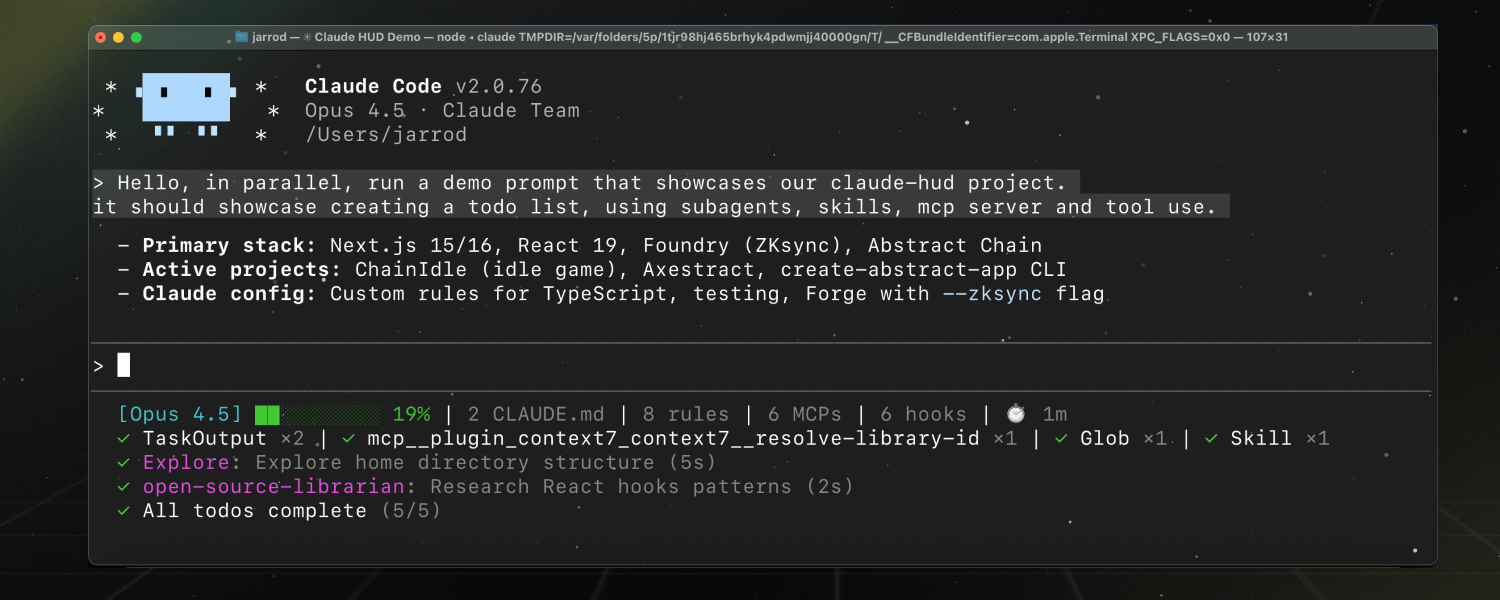
一个 Claude Code 插件,用于展示当前正在发生的情况——包括 上下文使用情况、正在使用的工具、正在运行的代理,以及待办事项的进度。它会始终显示在你的输入框下方
Claude Code
# xxx给CLAUDE.md加内容,@xxx针对某个文件进行操作To paste a screenshot into Claude, use
Ctrl+V(notCmd+Von macOS)Enable Planning Mode by pressing
Shift + Tabtwiceoption + t打开think mode(终端需要做设置)"Think" - Basic reasoning
"Think more" - Extended reasoning
"Think a lot" - Comprehensive reasoning
"Think longer" - Extended time reasoning
"Ultrathink" - Maximum reasoning capability
/effortCommand: Allows setting a persistent effort level for a session (e.g., /effort max for hard bugs).
You can rewind the conversation by pressing Escape twice
Creating Custom Commands:The filename becomes your command name - so
audit.mdcreates the/auditcommand.Find the
.claudefolder in your project directoryCreate a new directory called
commandsinside itCreate a new markdown file with your desired command name (like
audit.md)